

If you want to dynamically replace images, use image data binding.
- Keep the
.rivfiles tiny without potential bloat of larger assets - Dynamically load an asset for any reason, such as loading an image with a smaller resolution if the
.rivis running on a mobile device vs. an image of a larger resolution for desktop devices - Preload assets to have available immediately when displaying your
.riv - Use assets already bundled with your application, such as font files
- Sharing the same asset between multiple
.rivs
Methods for Loading Assets
There are currently three different ways to load assets for your Rive files. In the Rive editor select the desired asset from the Assets tab, and in the inspector choose the desired export option: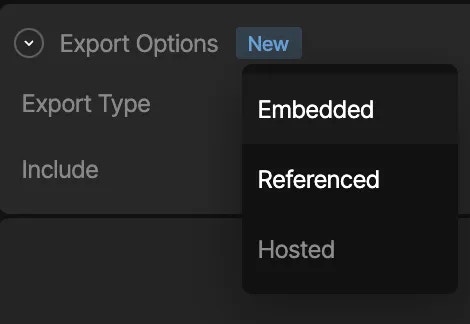
Embedded Assets
In the Rive editor, static assets can be included in the.riv file, by choosing the “Embedded” export type. As stated in the beginning of this page, when the Rive file gets loaded, the runtime will implicitly attempt to load in the assets embedded in the .riv as well, and you don’t need to concern yourself with loading any assets manually.
Caveat: Embedded assets may bulk up the file size, especially when it comes to fonts when using Rive Text (Text Overview).
Embedded is the default option.
Loading via Rive’s CDN
In the Rive editor, you can mark an imported asset as a “Hosted” export type, which means that when you export the.riv file, the asset will not be embedded in the file binary, but will be hosted on Rive’s CDN. This means that at runtime when loading in the file, the runtime will see the asset is marked as “Hosted” and load the asset in from the Rive CDN, so that you don’t need need to concern yourself with loading anything yourself, and the file can still remain tiny.
Caveat: The app will make an extra call to a Rive CDN to retrieve your asset
Hosted assets are available on Voyager and Enterprise plans. Learn more about
our plans and pricing.
Image CDNs
Some image CDNs allow for on-the-fly image transformations, including resizing, cropping, and automatic format conversion based on the browser’s and device’s capabilities. These CDNs can host your Rive image assets. Note that for these CDNs, you may need to specify the accepted formats, for example, as part of the HTTP header request:Referenced Assets
In the Rive editor, you can mark an imported asset as a “Referenced” export type, which means that when you export the.riv file, the asset will not be embedded in the file binary, and the responsibility of loading the asset will be handled by your application at runtime. This option enables you to dynamically load in assets via a handler API when the runtime begins loading in the .riv file. This option is preferable if you have a need to dynamically load in a specific asset based on any kind of app/game logic, and especially if you want to keep file size small.
All referenced assets, including the .riv, will be bundled as a zip file when you export your animation.
Caveat: You will need to provide an asset handler API when loading in Rive which should do the work of loading in an asset yourself. See Handling Assets below.
Handling Assets
Examples
- See the Rive Flutter example app.
Using the Asset Handler API
When instantiating aFile, add an assetLoader callback to the list of parameters. This callback will be called for every asset the runtime detects from the .riv file on load, and will be responsible for either handling the load of an asset at runtime or passing on the responsibility and giving the runtime a chance to load it otherwise.
Font Asset Example
asset and bytes.
asset- Reference to aFileAssetobject. You can grab a number of properties from this object, such as the name, asset type, and more. You’ll also use this to set a new Rive specific asset for dynamically loaded content. Types:FontAsset,ImageAsset, andAudioAsset.bytes- Array of bytes for the asset (if it’s available as an embedded asset)
Important: Note that the return value is a
boolean, which is where you need to return:trueif you intend on handling and loading in an asset yourself- or
falseif you do not want to handle asset loading for that given asset yourself, and attempt to have the runtime try to load the asset